

A GPS time clock app can help a small business confirm where employees start and end their shifts. Yet GPS features do not all work the same way. Some apps check location only when an employee clocks in or out. Others may collect location data for much more of the workday.
To begin with, owners should know what type of GPS tool they are buying. A location check tied to a time punch is very different from tracking someone throughout a shift. That difference can shape privacy concerns, worker trust, and the amount of data a company keeps.
For many field crews, the need is simple. The owner wants accurate hours and proof that a time punch came from the expected place. A GPS time clock app can meet that need without creating a record of every place an employee goes.
How Does a GPS Time Clock Work?
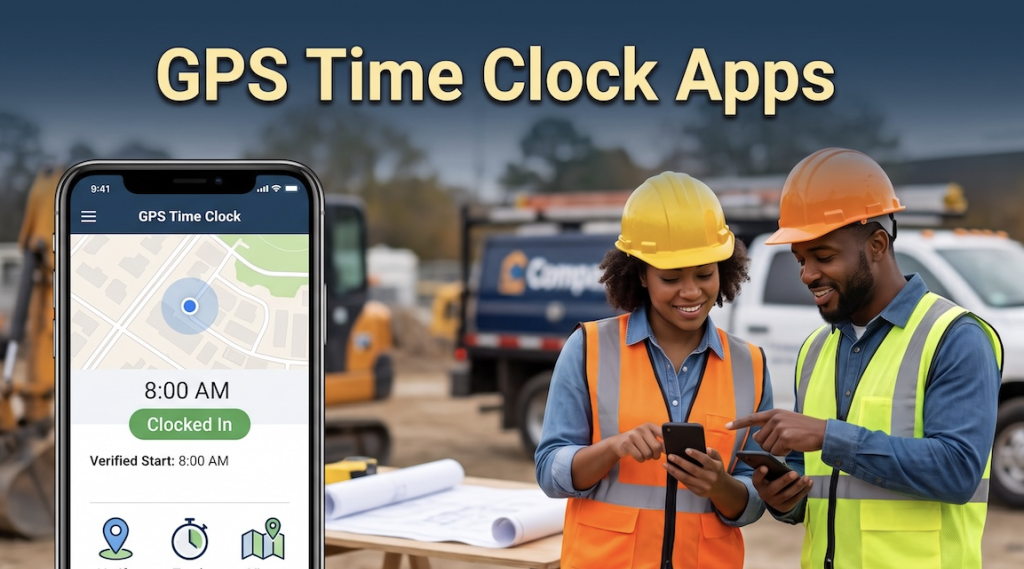
A GPS time clock app uses the location service on a phone or tablet along with a digital time clock. When an employee clocks in, the app records the time. Depending on the app, it may record the device location at that same moment.
For example, a plumbing worker may start the day at a customer’s home. The owner may be miles away and cannot confirm the arrival in person. A GPS stamp tied to the clock in record can show where that punch took place.
Next, the same process may happen when the worker clocks out. The manager can review the time entry and the location tied to it. In this case, GPS adds context to the time record instead of creating a full travel history.
Federal wage rules do not require employers to use GPS. The U.S. Department of Labor says covered employers must keep accurate records of employee hours and wages. It does not require one set form for those records.
GPS Verification and GPS Tracking Are Not the Same
This is the biggest point to compare before choosing a GPS time clock app. GPS verification records location during a set action, such as clock in or clock out. Ongoing GPS tracking can collect location at many points during a workday.
In other words, verification may answer one question: Where was the worker when this time punch was made? Once the punch is saved, the app may not need another location until the next time event.
By comparison, an ongoing tracking tool may show where a worker travels during the shift. It may create a route, record stops, or collect location in the background. Some companies have a work reason for that data. Many small field businesses only need proof tied to a work event.
For instance, a cleaning company may need to confirm arrival at a client property. A contractor may need to confirm that a crew started at the assigned site. In both cases, a GPS stamp can answer the main question without recording the worker’s full day.
Can a GPS Time Clock App Track Your Location?
Yes. A GPS time clock app can track location if the product is built and set up to collect that information. Yet the amount of location data can vary a great deal from one product to another.
Some apps capture one GPS point when an employee presses the clock button. Some use a geofence around a jobsite. A geofence sets a digital boundary and may limit where an employee can clock in or out.
At the same time, other tools may request background location access. That can let an app receive location data when the worker is not looking at the app. This is one reason buyers should ask how the feature works before choosing a product.
The better buying question is not simply, “Does this app have GPS?” Ask when location collection begins, when it ends, and what the employer can see. Those answers tell you far more about the level of monitoring.
What Does a Work GPS App Track on Your Phone?
A GPS time clock app does not gain automatic access to everything stored on a worker’s phone. An app can request access to certain phone features, and the worker may see those requests during setup.
For example, a time clock may need location access to record a GPS stamp. An app with job photos may request camera access. A scheduling tool may use notifications to tell workers about a new shift or change.
Those permissions are not the same as access to private texts, personal email, or every photo on the device. Still, owners should ask the vendor which permissions the app needs and why.
The Federal Trade Commission (FTC) tells mobile app makers to explain what they collect and how they use it. Its guidance says companies should limit collection, protect stored data, and seek consent before collecting sensitive information such as precise location.
This gives owners a useful test. If a GPS feature asks for phone access that does not fit its purpose, ask the vendor why it needs that permission.
What Privacy Should a GPS Time Clock App Offer?
Privacy should be part of the buying process from the start. A GPS time clock app may collect sensitive location data, so owners need to know what happens after that data is captured.
- To begin with, ask who can view location records. A manager may need to see the location linked to a time punch. That does not mean every person in the company needs access.
- Next, ask how long the vendor keeps GPS records.
- Find out whether the vendor shares location data with another company.
- Also, ask what happens to old records once the business no longer needs them.
In fact, the FTC has taken action against companies over the sale or sharing of precise location data. In a 2026 Kochava case, the agency said location data could reveal visits to sensitive places and trace a person’s movements.
A time clock vendor is not the same type of company as a data broker. Still, the case shows why owners should treat precise location records with care.
Can an Employer Track Employees With GPS?
An employer may use GPS for work in many cases, but there is no single U.S. rule that covers every device and every type of monitoring. State laws can add notice rules or limits in certain settings.
For example, Connecticut law requires prior written notice for certain forms of electronic monitoring. The law defines covered monitoring in part as collection on an employer’s premises. For that reason, owners should not treat it as a rule for every mobile GPS case.
California provides another example of why the details matter. Vehicle Code Section 4854 covers certain alternative vehicle devices with location technology. For covered devices, employers may monitor only during work hours and when it is strictly needed for job duties. The law requires notice before monitoring and protects the right to disable covered monitoring outside work hours.
These examples do not create one nationwide GPS rule. From there, businesses should check the laws in each state where employees work. Legal advice may help when a company plans ongoing tracking or uses employee-owned devices.
Why Employees Care About GPS Verification
Most employees know that a business needs time records for payroll. The concern often starts when workers cannot tell where timekeeping ends and location monitoring begins.
For example, an employee who uses a personal phone may wonder whether the company can see a lunch stop or trip home. If no one explains the GPS feature, that worker may assume the app collects far more than it does.
By comparison, a clock in location check is easier to explain. The worker knows which action creates the GPS record. The employer knows what that point is meant to verify.
It is important that time tracking does not feel like surveillance. Companies should use the smallest level of monitoring needed for the job. When employees understand what is being collected, when it is collected, and why it is needed, they are more likely to trust the system.
For many employees, understanding how GPS works can make a big difference. Workers are more likely to accept a GPS time clock app when they know what it sees, when it sees it, and why the company needs that information.
When GPS Verification Makes Sense for Field Crews
Field businesses face a timekeeping problem that office teams may not have. Workers often start the day far from the owner, payroll staff, or a central office.
For example, cleaners may report straight to client homes. Construction crews may begin at a new site each week. Repair workers may move from one customer to the next during the day.
In these cases, GPS verification can connect a time punch to a place. The manager gains a useful record without calling the worker or visiting the site. From there, the manager can review a punch when something looks wrong.
A location stamp may help with another common issue. If an employee clocks in before reaching the job, the manager has more information to review. The record can start a conversation instead of leaving the owner to guess.
For many field teams, that is the value of a GPS time clock app. It adds proof to the punch without making a full map of the worker’s movements the main goal.
What Real Businesses Have Seen in the Field
Real customer stories from ezClocker shows how GPS verification can fit field work.
For example, Pristine Property Services had workers at homes and commercial properties. Owner Lauren Poole said the company had lost money when employees clocked in before arriving at jobs. She wanted something with a GPS feature to prevent employees from clocking in before they arrived at work. Another business owner recommended ezClocker, saying that it was affordable and easy to use.
Lauren looked at some other time-tracking apps, but they didn’t have the GPS feature, or were too expensive, or offered features that Lauren didn’t need.
ezClocker allows them to review where workers clocked in. They gained better control of their time records.
Another example is Orion Marble & Granite. Its crew worked at jobsites in Idaho and nearby areas. The company needed a simple time system that employees could use in the field and found ezClocker had the features they needed. Its case study says GPS verification lets Violeta Chavez review where employees clock in and out when they are away from their location
AFL provides a good example from the field service industry. Its employees work across regions on data centers, fiber optics, security systems, and other projects. Matt Creason, Director of Operations, said one benefit of ezClocker was the GPS stamp tied to each time entry. It gave managers a simple way to verify where employees clocked in and out.
These businesses have very different crews. Yet each example shows how location tied to a time event can give a manager useful proof.
GPS Time Clock App Buyer Checklist
Before choosing a GPS time clock app, ask each vendor the same set of questions. This makes privacy and tracking differences much easier to compare.
- Does GPS record location only when employees clock in and out?
- Will the app collect location during the rest of the shift?
- Is background location access required?
- Does the app use a geofence?
- Can employees stop location access outside work hours?
- What location details can managers see?
- How long does the vendor keep GPS records?
- Who inside the company can view location data?
- Will the vendor share location data with another company?
- What happens if GPS service is weak?
- Can a manager correct an incorrect time entry and keep a record of the change?
- Are employees able to review their own time entries?
- Can you test the system with a small crew before a full rollout?
At the end, compare those answers with the problem you need to solve. A longer feature list is not always a better fit. The right tool should provide enough information without collecting data your business does not need.
How to Introduce GPS Time Tracking to Your Crew
A good rollout starts before the first clock in. Introducing your time clock and GPS app should be simple and straightforward. Follow these steps to help employees understand what to expect.
- First, tell employees why the business is adding GPS to its time records. Tie the reason to a clear business need, such as jobsite verification or more accurate payroll records.
- Next, explain when the app collects location. If GPS works only when employees clock in and out, say that in plain language. If location can be collected during a shift, explain when and why that happens.
- Then, show employees the phone permissions they may see. Tell them who can review GPS records. Give employees a clear way to report a missed punch or a location that looks incorrect.
- Finally, put the policy in writing. Managers should follow the same process with every employee.
Consistent rules help keep the system focused on accurate timekeeping instead of making employees wonder how much they are being watched.
Avoid Buying More GPS Tracking Than You Need
More GPS data does not always lead to better time records. In some cases, it creates more information for managers to review and more private data for the company to manage.
Suppose the main problem is workers clocking in before reaching a jobsite. A GPS point at clock in may answer that question. A map of the employee’s entire day may add little value to the time record.
The FTC gives businesses a similar privacy principle. Its guidance recommends collecting only the information a business needs and keeping personal data only as long as there is a business need for it.
When thinking about the systems you need, start with the problem instead of the feature. Decide what you need the GPS information to prove. Then choose the smallest level of tracking that can give you that answer.
Choosing a GPS Time Clock App Your Crew Can Accept
The right GPS time clock app should give the business useful time data and give workers clear limits. For many field teams, GPS verification can provide that balance.
Start by deciding what you need to confirm. Next, compare when each app records location, what permissions it needs, and how long it keeps the data. Ask what happens outside work hours too.
ezClocker records a GPS location when an employee clocks in or out through its mobile app. Its website says the GPS stamp lets managers verify that a worker was at the correct jobsite when the punch was made.
Small businesses that want to see how this type of mobile employee time tracking works can test it with a few crew members first. A trial can show whether employees find the clock process easy and whether the GPS information gives managers what they need.
At the end, a time clock should answer work questions without creating new privacy concerns. The goal is accurate time, useful jobsite proof, and a process your crew can understand.