

If you run a home care agency, you may have heard of electronic visit verification, or EVV. But what is EVV and what does it mean for your business? EVV checks key facts about visits that Medicaid pays for. These records help states confirm that covered care took place.
For small agencies, EVV rules can seem hard to follow. States may use different tools, and Medicaid plans may set their own steps. This guide explains the basics, the role of GPS, and common mistakes. It shows how to keep better records without mistaking a time report for a state EVV system.
What Is EVV in Home Care?
Electronic visit verification checks when, where, and by whom certain home care services take place. For example, a caregiver may help a client bathe, dress, and prepare meals at home. An EVV system records the visit facts that Medicaid requires. Then, the state or payer can compare those facts with a claim.
The 21st Century Cures Act sets the federal EVV rules. The Centers for Medicare and Medicaid Services (CMS)explains the law and state duties. Its CMS Informational Bulletin on EVV gives states more guidance. Still, each agency must learn how its own state puts those rules into practice.
Who Must Use Electronic Visit Verification?
EVV applies to Medicaid personal care services and home health care services that call for a visit in the home. Personal care may include help with dressing, meals, or bathing. Home health care may include nursing or certain therapy visits. The rule does not cover every visit made by every home care business.
States faced federal EVV dates of January 1, 2020, for personal care, and January 1, 2023, for home health care. Some states received extra time under federal rules. For a clear overview, see the guidance on EVV and home care visits. Next, check which of your agency’s services your state covers.
Are There Exceptions to EVV Requirements?
Federal guidance treats visits by a caregiver who lives with the client as outside the federal EVV mandate. It covers only the home portion of a service that takes place in several settings. But state rules may go further. For example, Pennsylvania EVV questions and answers say that live-in caregivers must use EVV there. Always confirm any exception with your state Medicaid agency.
What Are the Six Required EVV Data Points?
The federal rule names six pieces of visit data. The CMS guide to EVV requirements describes these items. In practice, your team needs a clear way to record each one.
| Required data | Example during a visit |
| Type of service | Personal care or nursing |
| Person receiving care | Client name or ID |
| Person providing care | Caregiver name or ID |
| Date of service | Day care took place |
| Location of service | Where care took place |
| Start and end time | When the visit began and ended |
For example, a caregiver arrives at 9 a.m. and leaves at noon. The EVV record must connect those times to the client, caregiver, date, place, and service. In many systems, clock entries collect some facts at once. Still, the agency needs to review missing or incorrect details.
Need an Employee Time Tracking App with GPS verification?
How Do EVV Requirements Vary by State?
Federal law sets the baseline, but states choose their EVV approach. Some require one system, and others allow outside tools that meet state rules. In some cases, managed care plans have different steps. The main models below explain those choices.
Open Model EVV
An EVV open model allows an agency to choose a system that meets the state rules. But that choice does not remove the need to send visit data to the state aggregator. An aggregator receives records from different EVV tools. The Pennsylvania Department of Human Services explains how its alternate systems connect to the state aggregator.
Closed Model and Other Choices
A closed model requires the state’s chosen system. A provider choice model gives agencies a set of approved options. Under managed care choice, the health plan may choose the system. A state may use more than one model, so check each program and payer.
Challenges With More Than One EVV System
Agencies that serve more than one state or Medicaid plan may face several EVV processes. This can add office work and raise the risk of missing records. For example, one payer may accept a visit that another system cannot match.
- Different formats: Each payer may ask for data in its own format.
- Duplicate work: Staff may need to review visits in several systems.
- Unmatched records: A visit may fail to match a claim or service approval.
- Payment delays: Missing data may hold up a claim under local rules.
To stay organized, keep a list of which system serves each payer. Then, train staff to use the right process for each visit.
How to Find Your State’s EVV Requirements
State EVV rules and claim checks can change over time. So, start with your Medicaid agency, not online charts that may be out of date. Use these three steps and save the date of each answer.
1. Check Your State Medicaid Website
Look for an EVV page with service lists, training, and provider notices. The state Medicaid agency directory can help you find your state office. Next, ask whether the state uses an open, closed, or other model. Sign up for updates when possible.
2. Ask Each Medicaid Managed Care Plan
If you serve clients in different plans, ask each plan how it gets EVV data. Find out what happens when a visit fails to match a claim. Then, write down the required system and contact person for each plan.
3. Ask Questions Before Buying a Tool
Ask if the EVV tool can send data to your state aggregator. Next, check if it works for every Medicaid plan you serve. Find out how staff record visits without cell service. Finally, ask about training, support, and total cost before you pay.
Is GPS Required for EVV Compliance?
Federal EVV rules require the location of care, but they do not require GPS. Some EVV tools use a phone call from the client’s home. Others use a mobile app that saves GPS coordinates at the start and end of a visit. The New York State EVV guidance explains that GPS is not a federal requirement.
GPS verification can help show where a worker clocked in and out. But buildings or weak signals may make location readings less exact. Tell staff what location data you collect and when. Next, check state rules on notice, privacy, and consent.
What if the GPS Signal Fails?
A caregiver may not have a strong signal at a client’s home. When that happens, use the backup method your state or payer approves. Keep notes on the issue and any correction. In other words, GPS data alone cannot replace a complete EVV record or the required state system.
What Happens When an EVV Visit Is Not Verified?
A missing EVV record can affect Medicaid billing. For example, a claim may show three hours, but the visit record may show two. In some states, the payer may hold or deny the claim until staff resolves the issue. Some programs can seek repayment or require a plan to fix repeat errors.
Missouri has published guidance on EVV claims validation, which links visit records to claim checks. The exact outcome still depends on your state and payer. So review records before you bill, not only after a claim fails.
Common Errors That Can Delay Payment
- A caregiver chooses the wrong client or service type.
- The service date or number of hours does not match the claim.
- A visit lacks a clock time or an approved correction.
- A visit does not match the care the client was approved to receive.
Next, compare EVV visits with schedules, service approvals, and claim details. Ask caregivers to flag errors as soon as possible. Then, fix records through your state’s approved process. Daily checks can help prevent a long list of errors at billing time.
How Can Home Care Agencies Keep Better Visit Records?
EVV is only one part of home care records. Agencies still need clear employee hours for payroll and staffing. For example, a caregiver may serve several clients in one day. The agency needs to know which shifts each person worked and which visits need EVV.
In its case study, Holistic Homecare Services describes using a timekeeping system to manage caregiver schedules and hours. The team matches caregivers to client needs and keeps track of shifts. Still, time records and state EVV records serve different jobs.
Set clear clock rules and check missing entries each week. Keep notes when a visit changes or a client cancels. Save the original files, too. These habits make it easier to look back at a workday and answer questions.
How ezClocker’s GPS Report Supports Agency Records
The ezClocker time entries report exports employee work times with GPS verification at clock in and clock out. It shows both dates, both times, and GPS coordinates for each event. The report is available on every plan and can cover any date range. It downloads as a CSV file.
The file has a Notes column and may show a Jobs column. An agency can label the Jobs column Clients in an exported copy. On plans without jobs, the report still includes notes, times, and GPS details. Caregivers can put service types in Notes if the team agrees on a simple format.
How to Export Time Entries With GPS
Open Export Time Entries and choose All Employees. Next, select Time Entries with GPS under Select Report Grouping. Choose the start and end dates. Then, select Export to download the CSV file.
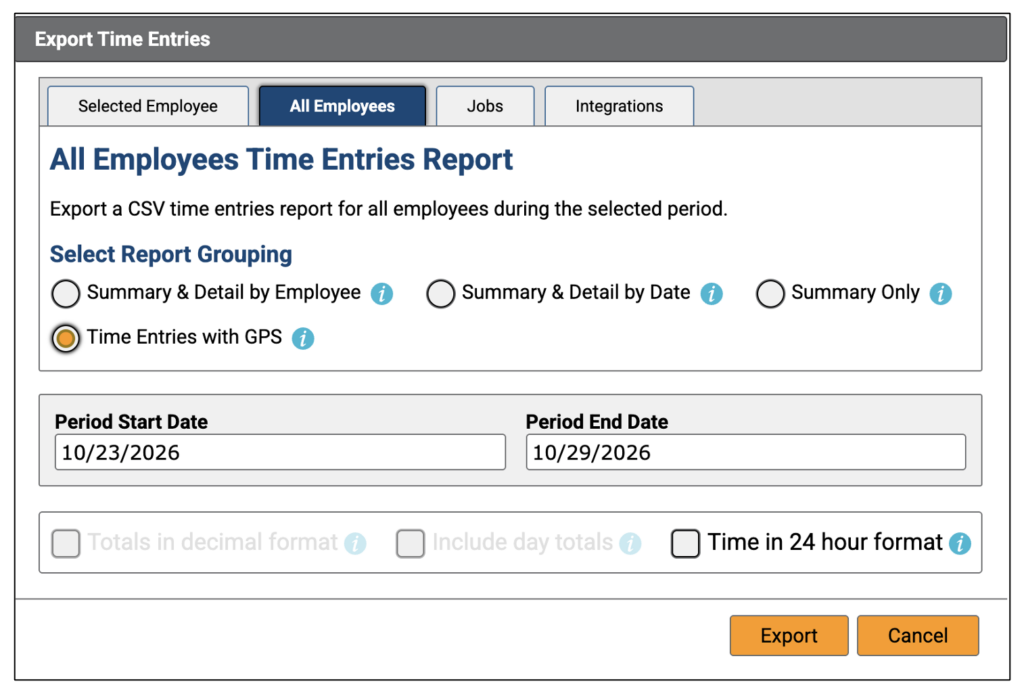
Time Entries with GPS is selected under report grouping.
How to Use the Exported Report
A manager can review a past week or another date range. The CSV helps the team compare work times, GPS coordinates, and notes. If you share a copy, change only formatting, such as column labels or order. Keep an untouched original, and never change the dates, times, or coordinates.
The report supports an agency’s records, but it is not a state EVV system. It does not send visits to a state aggregator or replace the EVV tool your state requires. For that reason, check payer rules before sharing any report.
Where Should Your Agency Start?
First, confirm which services and EVV system your state requires. Next, ask staff to check each visit for the six required details. Then, review any missing records and train your team on approved corrections. Keep the rules and contact names in one place for later use.
Final Thoughts
EVV can feel complex at first, but a clear routine makes the work easier. Check state rules, train your staff, and review visit records before billing. If your agency uses ezClocker, try a Time Entries with GPS report for a recent week. You can use it to review staff time and location records alongside your required EVV process.